
Generic Interface
An abstract view of network traffic. Build zone and host rules without knowing port numbers, with NAT support and rule inheritance for nested zones.

KDE Desktop Environment · Linux · IPTables
KMyFirewall is an IPTables based firewall configuration tool for the KDE Desktop Environment. It turns a personal firewall into a few clear decisions instead of a long evening with the IPTables manual.
Free software under the GNU General Public License. Built for Linux systems with IPTables 1.2 and KDE 3.3 or later.
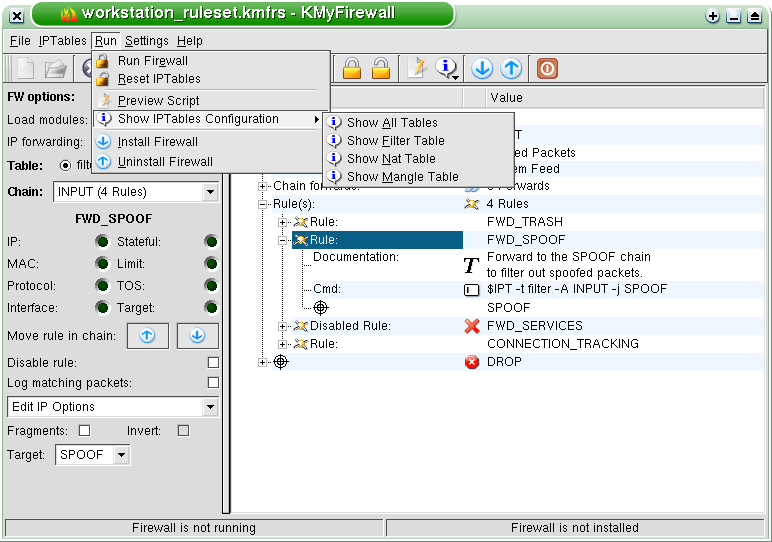
KMyFirewall attempts to make it easier to set up IPTables based firewalls on Linux systems. It is the right tool if you want a personal firewall on your Linux box but do not have the time or the interest to spend hours in front of the IPTables manual just to set up a firewall that keeps the bad people out.
The firewall can save entire rulesets, so you configure a ruleset once and reuse it on several computers with a similar configuration: school networks, offices, universities.
Programs cannot do any magic, so you still have to know what your firewall should do. KMyFirewall helps as much as possible, but you decide what it will do.
Always test a ruleset before you use it on a production system. The handbook explains the limits of any configuration tool.
An abstract view of network traffic. Build zone and host rules without knowing port numbers, with NAT support and rule inheritance for nested zones.
A close representation of the IPTables ruleset. Edit chains, matches and targets directly, with plugins for stateful filtering, NAT, MANGLE and logging.
Entire rulesets can be saved and applied to several computers, which makes KMyFirewall useful for school networks, offices and university labs. Predefined templates cover common setups such as a workstation, a NAT firewall and a web server. Custom templates can be saved for your own network.
Version 1.1 adds multi target configuration and remote firewall control. Define a target with its IP address and SSH port, set it as the active target, and manage its ruleset as you would on localhost. All communication is encrypted using SSH.
Get KMyFirewall 1.1.1 and check the release notes.
You need Linux 2.4 or later, IPTables 1.2 or later, and KDE 3.3 or later. See Requirements.
Follow Getting started and choose the interface that fits your network.
Use the build steps in Compilation and installation.
Manage several firewalls from one document and control remote hosts over SSH.
Detect network interfaces, application paths and the init system for you.
One editor for normal users, one for IPTables experts. Both work on the same document model.
A transaction based engine with multiple levels, so experiments are easy to reverse.
Start from templates for a workstation, a NAT firewall or a web server, then adjust them.
Almost full integration with KDE, including install scripts for the boot process.
The KMyFirewall Handbook covers the interfaces, IPTables theory and plugin development. Open the handbook or start with Getting Started.
Download KMyFirewall 1.1.1, read the requirements and build your first ruleset.